How to Use D-Control?
Using DControl (Defender Control) What is Defender Control? Defender Control is a small, portable freeware application that allows you to disable Microsoft Defender in Windows completely.
Why Use Defender Control?
Our software performs tasks that are often prevented by antivirus programs, including Microsoft Defender. By using Defender Control, you can ensure that these tasks are not interrupted, improving efficiency and avoiding unnecessary disruptions.
tip
In short you will need to disable Windows Defender. Using Defender Control. This guide will assist you in setting up Defender Control
You can follow the offical guide here
For more assistance, visit our support page.
How to Use Defender Control
Download and Unzip
Download Defender Control from the official source.
Unzip the downloaded file.
Password :
sordum
Run the Program
Run the
dControl.exefile.
Add to Exclusion List
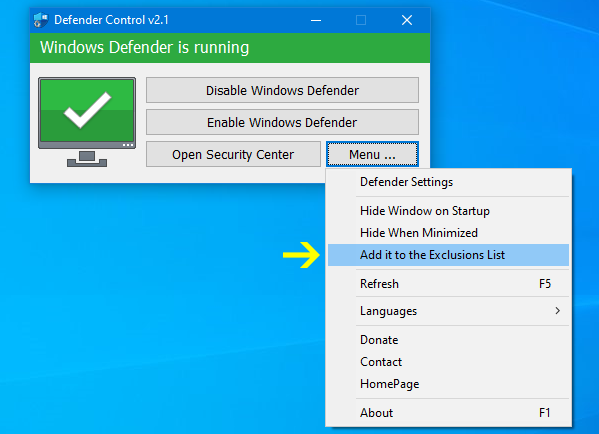
After running the software for the first time, use the "Add it to the exclusion list" feature found under the menu.
This prevents possible false alerts and creates a shortcut on the desktop.
Excluded Defender Control path:
C:\Program Files (x86)\DefenderControl\dControl.exe
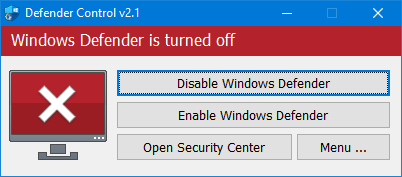
Ensure Microsoft Defender is Disabled

You may need to disabled anti-tamper prevention, Defender Control will prompt you if this is necessary
For more details and to download Defender Control, visit the official Defender Control website.
Last updated
Was this helpful?